Prices and features checked November 2026. Tools change; check theirs before you decide. Visit Cupla's site.
Choose Cupla if your main problem is seeing both of your schedules in one place, especially if your calendars already live in Google, Apple or Outlook. Choose Tiptoe if your calendars are fine and the real problem is that one of you keeps track of the chores and follow-up. Both are built for two people, both have a free plan, and both offer shared to-dos, so the decision comes down to which job you need done first.
This comparison uses Cupla's own site, help center and App Store listing, opened in November 2026. Apps change, so check the listing before you pay. We make Tiptoe, so weigh this page with that in mind.
Who should choose which?
Choose Cupla if:
- You both have busy schedules, and "are you free Thursday?" is the question you ask most.
- You already keep calendars in Google, Apple or Outlook and want them merged in one view without retyping.
- One of you uses Android. Tiptoe has no Android app, and Cupla does.
- You want date planning, wishlists and an AI assistant that can suggest plans from your calendar.
- You would like a lower annual price.
Choose Tiptoe if:
- Your disagreements are about who was supposed to do something, not when something is happening.
- You want each recurring chore to have one named owner, plus a way to propose moving it when life changes.
- You want a weekly check-in where what you decide becomes a task with an owner.
- You want a thank-you and a nudge built into the home screen.
- You want the shared work to be the center of the app, with the calendar alongside it.
Side by side, as of November 2026
Price
- Cupla: Free plan, plus a Premium subscription that starts at USD 4.99 per couple per month. The US App Store listing shows monthly options of $4.99, $5.99 and $7.99, yearly options of $34.99 and $44.99, and Cupla Plus at $39.99, without saying which applies to whom. Cupla says pricing varies by region, so check the price in the app. A free trial of Premium is offered.
- Tiptoe: Free for both partners with no card. The free account includes the couple's first 30 tasks and chores, combined, and every one created counts, even if deleted. Pro is $9.99 per month, billed monthly, and upgrading charges right away.
Cost for two
- Cupla: One subscription per couple.
- Tiptoe: One Pro subscription covers both partners.
Platforms
- Cupla: iPhone, iPad, Android and the web, according to its site. The US App Store listing shows iPhone (iOS 16 or later), Mac with Apple silicon, and Apple Vision compatibility.
- Tiptoe: iPhone and the web at app.tiptoe.ai. No Android app.
Calendar
- Cupla: The core of the product. It syncs Google, Apple, Outlook and other on-device calendars into one color-coded view, with two-way sync and privacy controls, and its App Store listing also mentions work rosters and shared family calendars.
- Tiptoe: One shared calendar with both partners' plans, key dates such as birthdays and anniversaries, and tasks with a day or time. Connecting an existing calendar is optional. A calendar feed for Apple or Google Calendar is part of Pro.
Tasks and chores
- Cupla: Shared tasks with priorities, labels, reminders, recurring tasks and assignment to one or both partners. Its App Store listing specifically mentions chores, groceries and errands.
- Tiptoe: Tasks with owner, due date, repeat, notes and private tasks. Recurring chores have one owner and a schedule, on the days you pick, weekdays or weekends, monthly or quarterly. Shared lists are separate. Tasks are assigned to You, your partner or Together.
Free plan limits
- Cupla: Its help center says you can always see your own events and to-dos on any date. Your partner's events and to-dos appear within a limited window around today, and your partner's undated to-dos need Premium. Grocery lists, wishlists, date planner, key dates, widgets and desktop are included in both plans. Cupla AI is included with fair usage limits.
- Tiptoe: The limit is 30 tasks and chores in total. Free also includes recurring chores, lists, the calendar, thank-yous, reminders and the weekly check-in.
Dates and connection
- Cupla: Date planner with a date-frequency goal, reminders and photo memories. Wishlists that save links from other apps. Countdowns to key dates.
- Tiptoe: Key dates on the calendar, thank-yous, Thinking of You messages, profiles with private gift ideas and a weekly check-in.
AI
- Cupla: Cupla Assist can plan dates, find shared free time, suggest gifts, turn free-text notes into events and to-dos, and send a Monday preview of the week. The listing says the assistant can be turned off.
- Tiptoe: Its product facts list no planning assistant like this. Insights on completed work is a Pro feature, built only from what you keep in the app.
Privacy notes
- Cupla: Its App Store label, reported by the developer, lists contact info, location, identifiers, usage data and diagnostics as data linked to you.
- Tiptoe: No bank linking or location tracking. Data is stored on AWS in Ohio, with separate private and shared records. Gift ideas stay private to the giver.
What Cupla does better
Bringing existing calendars together. This is the main thing Cupla exists to do, and it goes further than Tiptoe here. If your work calendar is in Outlook, your partner's is in Google and you each have a family calendar too, Cupla is designed to bring those into one view with sync in both directions. That removes real work, and it's the best reason to choose it.
Android. If one of you uses Android, Cupla has an app for you, and Tiptoe doesn't. A partner on Android could use Tiptoe in a phone browser at app.tiptoe.ai, but that isn't the same as a native app. If this is your situation, it may settle the question.
Date planning. Cupla has a dedicated date planner with a frequency goal, wishlist links and AI suggestions. If you want help making dates happen, that's a stronger feature set than Tiptoe's.
Yearly price. At the listed yearly prices of $34.99 to $44.99, Cupla Premium costs less over 12 months than Tiptoe Pro, which comes to $119.88. Tiptoe bills monthly only. Check the price shown for your region.
Free use over the long run. Tiptoe's free plan is capped at the first 30 tasks and chores. Cupla's free plan limits how far you can see into your partner's data, not how many to-dos you create. If you'd create many items and want to stay free, read both limits against how you actually use a list.
What Tiptoe does differently
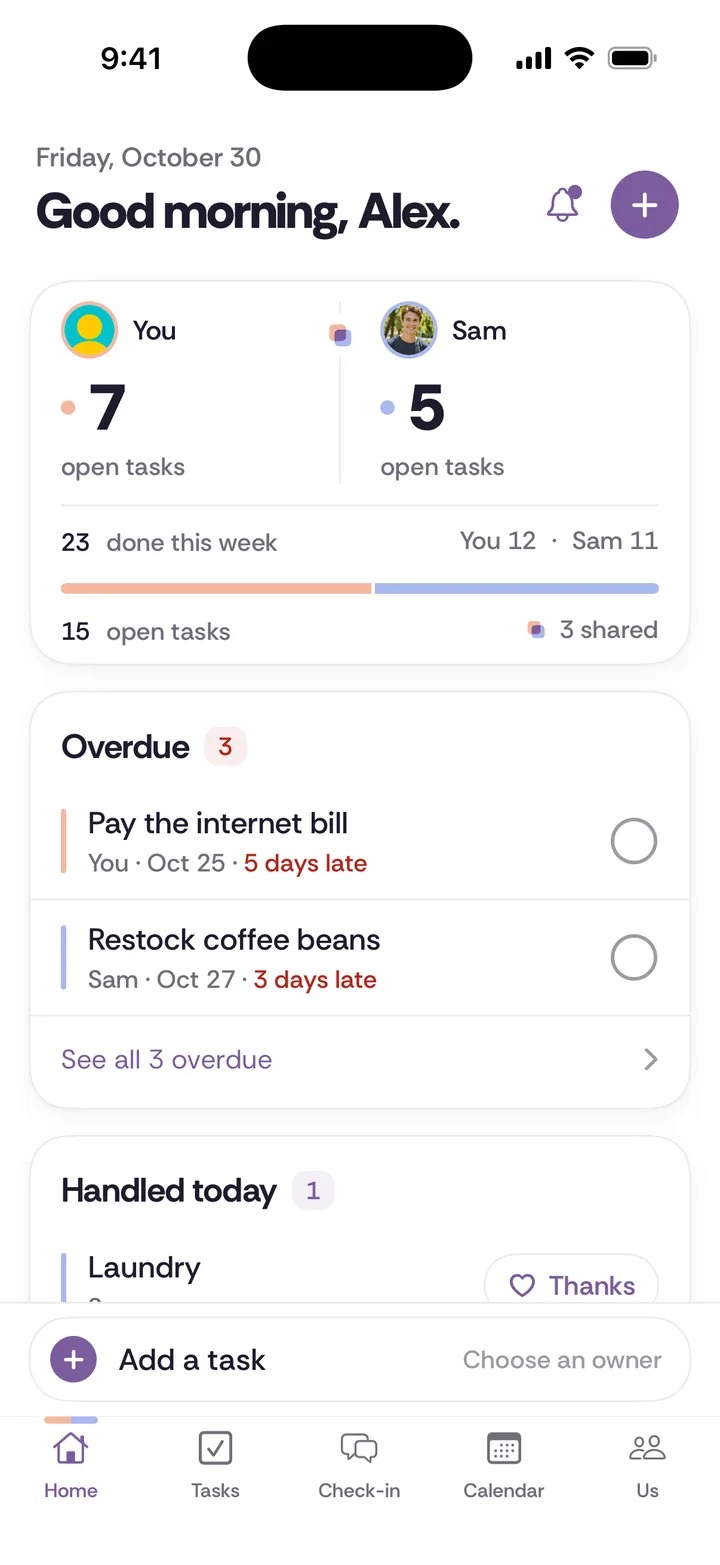
It starts from who owns the job. Tiptoe treats each chore as a whole job with one owner: the noticing, the planning, the doing and the follow-up. Cupla can assign a recurring to-do too, so this isn't about a missing button. The difference is where the product puts your attention. In Tiptoe, Home opens on open and overdue tasks and what got done today. In Cupla, the center of the app is the calendar.
Handoffs are a defined step. When a schedule changes, you can propose a handoff on a chore. Your partner accepts it or keeps things as they are, and a chore doesn't move without that decision. It's a small thing that matters if "I thought you had that" is a familiar sentence.
Credit by assignment, not a score. A completed item counts for the person it was assigned to. You can send thanks, or nudge about an overdue item so you aren't asking again in person. There are no points or rankings. See anti-scorekeeping for the thinking behind that.
A weekly check-in with outcomes. Either of you can add topics during the week. You talk them through at a time you choose, and what you decide becomes a task with an owner. Cupla's Monday preview tells you about the week ahead. Tiptoe's check-in is a conversation about it. Those are different tools.
Tiptoe isn't therapy and doesn't promise any outcome for your relationship. It's a place to keep agreements visible.
Test it on one real week
Abstract feature lists won't settle this. Run one ordinary problem through both.
Say your dishwasher breaks on a Tuesday. Someone has to notice, look up the model, call for a repair, find a time when someone is home, let the technician in and check that it worked.
- In Cupla, the appointment goes on the calendar, and both of you can see who is free on Thursday morning. You'd add a to-do for the follow-up and assign it. If "who's home Thursday?" was the hard part, you're done.
- In Tiptoe, the job becomes a task with one owner, a due date and notes with the model number. The other partner can see it's handled and nudge if it goes overdue. If "whose job is this?" was the hard part, you're done.
Ask which of those two sentences sounds like your home. If it's both, start with the one that causes more arguments.
Could you use both?
You can, but keep a clear boundary so that you don't maintain two versions of the plan. One clean split: Cupla or your existing calendar holds appointments and availability, and Tiptoe holds who owns what. If you find yourselves entering the same task in both, choose one and delete the other. Our couples calendar guide covers how to set up a single source of truth.
Switching from Cupla to Tiptoe, or the other way
Don't try to move everything. You'd copy over a lot of things that don't matter anymore.
Step 1. Screenshot anything you want to keep for reference, such as wishlists and memories in Cupla, or decisions in Tiptoe.
Step 2. List only the recurring jobs and the open tasks of the next 30 days. Most other things have an end date, or they'll come up again.
Step 3. Moving to Tiptoe, remember the free limit is 30 tasks and chores in total, so enter the important recurring ones first. A recurring chore does more for you than a one-off errand.
Step 4. Moving to Cupla, connect your calendars first. Then add to-dos and assign them.
Step 5. Run both for one week at most, then cancel what you're not using. Subscriptions bought through Apple or Google are managed in that store, and Cupla says plan changes and cancellations happen there.
Tiptoe has a no-account demo if you want to look around first, and the pricing page has the full comparison of Free and Pro.
The free option that uses neither app
You may not need another app. A shared Google Calendar costs nothing and covers availability for many couples. Pair it with one sheet of paper listing each recurring job and its one owner, and with a 15-minute talk on Sunday. Our free chore split worksheet and chore split calculator can help you fill in that sheet, and the weekly check-in guide gives the talk some structure.
Try that for a month. If the calendar is what breaks down, that points toward Cupla. If the list goes stale and nobody follows up, that points toward Tiptoe. Our roundups of shared calendar apps and chore apps cover other options as well.
Try it in Tiptoe
Use the public demo to compare one real responsibility, then read the plans and terms. Free for both of you. Pro is $9.99/month. No card needed. Your first 30 tasks and chores are free.
Questions before choosing
Is Cupla free?
Cupla has a free plan and an optional Premium subscription, as of November 2026. On the free plan, your partner's events and to-dos appear within a limited window around today. Premium starts at USD 4.99 per couple per month, according to Cupla's help center, and prices vary by region.
Does Cupla work on Android? Does Tiptoe?
Cupla has an Android app. Tiptoe does not. Tiptoe runs on iPhone and on the web at app.tiptoe.ai, so a partner on Android would need to use a browser.
Which is better for chores, Tiptoe or Cupla?
Both can assign recurring to-dos to a partner. If you only need chores to show up as reminders next to the calendar, Cupla can do that. If you want one owner for each chore, proposed handoffs and credit by assignment, Tiptoe is built around that.
Can my husband or wife use it if I pay?
In both apps, yes. Cupla Premium is one subscription per couple, and one Tiptoe Pro subscription covers both partners. The same applies to a boyfriend or girlfriend, since neither app asks that you be married.
Do we have to stop using our current calendar?
No. Cupla is designed to sync with calendars you already use. Connecting an existing calendar is optional in Tiptoe, and you can keep your current one for appointments while using Tiptoe for who owns what.
Do we need to replace our current tool?
No. Keep it if both people use it and it handles the problem. Choose clear boundaries if you use more than one tool, so you do not maintain competing versions of the same plan.
What does it cost for two?
Tiptoe is free for both of you. Pro is $9.99 a month and adds unlimited tasks and chores, Insights, every past check-in, a calendar feed and email tasks in. No. You share one space, and Free covers both of you. If you choose Pro, one subscription covers both partners. Your free account includes your first 30 tasks and chores. Every one you create counts, open or done, and deleting one doesn't give it back.
Is there a native iPhone app?
Tiptoe is on iPhone, and the same shared week is on the web at app.tiptoe.ai.